Getting Started


Key Features
LangDB exposes two complementary capabilities:
- Chat Completions Client – Call LLMs using the
LangDbPython client. This works as a drop-in replacement foropenai.ChatCompletionwhile adding automatic usage, cost and latency reporting. - Agent Tracing – Instrument your existing AI framework (ADK, LangChain, CrewAI, etc.) with a single
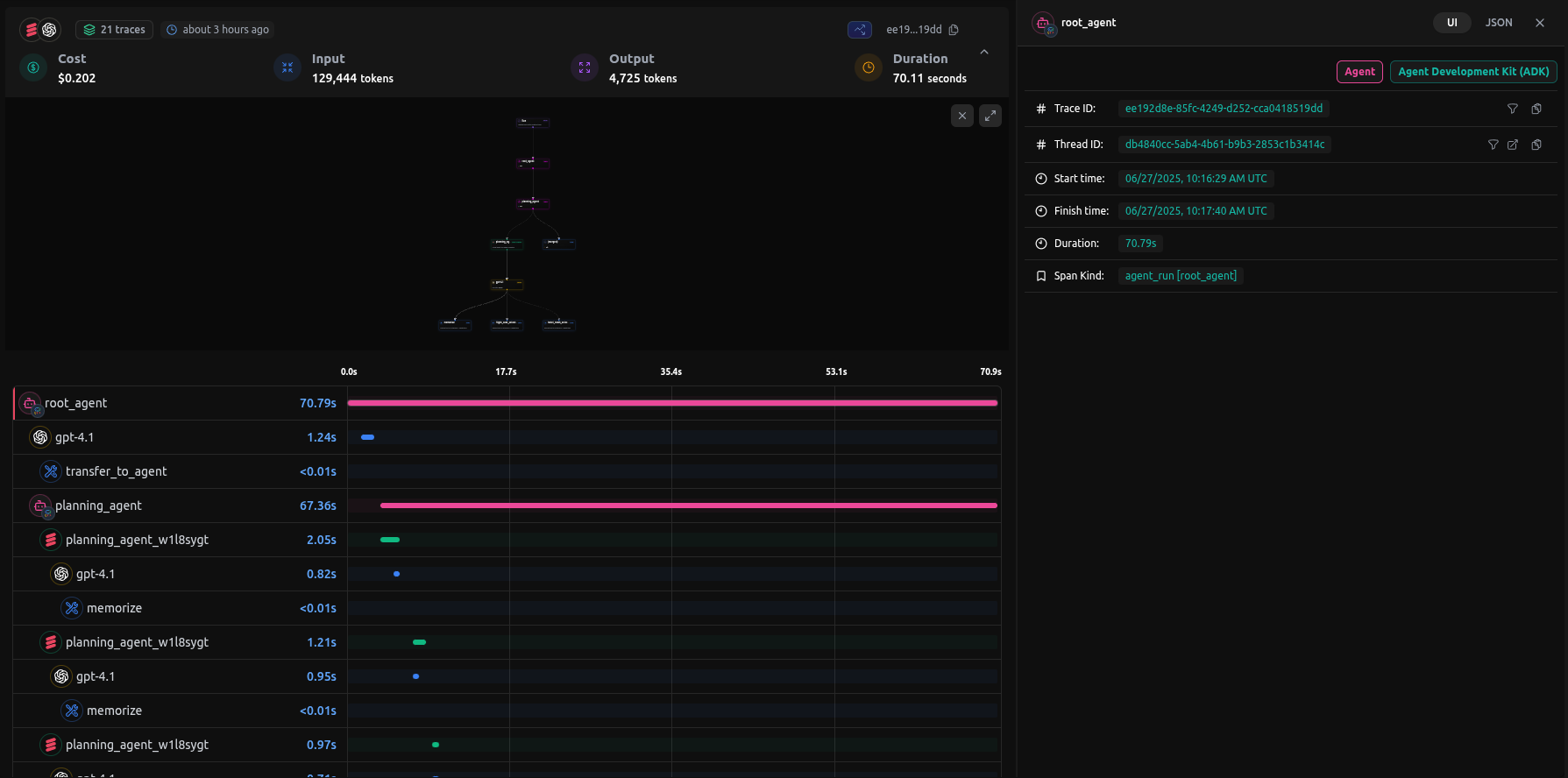
init()call. All calls are routed through the LangDB collector and are enriched with additional metadata regarding the framework is visible on the LangDB dashboard.
Quick Start (Chat Completions)
pip install pylangdb[client]
from pylangdb.client import LangDb

# Initialize LangDB client
client = LangDb(api_key="your_api_key", project_id="your_project_id")

# Simple chat completion
resp = client.chat.completions.create(
    model="openai/gpt-4o-mini",
    messages=[{"role": "user", "content": "Hello!"}]
)
print(resp.choices[0].message.content)
Agent Tracing Quick Start
# Install the package with Google ADK support
pip install pylangdb[adk]
# Import and initialize LangDB tracing
# First initialize LangDB before defining any agents
from pylangdb.adk import init
init()

import datetime
from zoneinfo import ZoneInfo
from google.adk.agents import Agent

def get_weather(city: str) -> dict:
    if city.lower() != "new york":
        return {"status": "error", "error_message": f"Weather information for '{city}' is not available."}
    return {"status": "success", "report": "The weather in New York is sunny with a temperature of 25 degrees Celsius (77 degrees Fahrenheit)."}

def get_current_time(city: str) -> dict:
    if city.lower() != "new york":
        return {"status": "error", "error_message": f"Sorry, I don't have timezone information for {city}."}
    tz = ZoneInfo("America/New_York")
    now = datetime.datetime.now(tz)
    return {"status": "success", "report": f'The current time in {city} is {now.strftime("%Y-%m-%d %H:%M:%S %Z%z")}'}

root_agent = Agent(
    name="weather_time_agent",
    model="gemini-2.0-flash",
    description=("Agent to answer questions about the time and weather in a city." ),
    instruction=("You are a helpful agent who can answer user questions about the time and weather in a city."),
    tools=[get_weather, get_current_time],
)
Note: Always initialize LangDB before importing any framework-specific classes to ensure proper instrumentation.
Example Trace Screenshot
Supported Frameworks (Tracing)
| Framework | Installation | Import Pattern | Key Features |
|---|---|---|---|
| Google ADK | pip install pylangdb[adk] | from pylangdb.adk import init | Automatic sub-agent discovery |
| OpenAI | pip install pylangdb[openai] | from pylangdb.openai import init | Custom model provider support and Run Tracing |
| LangChain | pip install pylangdb[langchain] | from pylangdb.langchain import init | Automatic chain tracing |
| CrewAI | pip install pylangdb[crewai] | from pylangdb.crewai import init | Multi-agent crew tracing |
| Agno | pip install pylangdb[agno] | from pylangdb.agno import init | Tool usage tracing, model interactions |
How It Works
LangDB uses intelligent monkey patching to instrument your AI frameworks at runtime:
Click to see technical details for each framework
Google ADK
- Patches
Agent.__init__to inject callbacks - Tracks agent hierarchies and tool usage
- Maintains thread context across invocations
OpenAI
- Intercepts HTTP requests via
AsyncOpenAI.post - Propagates trace context via headers
- Correlates spans across agent interactions
LangChain
- Modifies
httpx.Client.sendfor request tracing - Automatically tracks chains and agents
- Injects trace headers into all requests
CrewAI
- Intercepts
litellm.completionfor LLM calls - Tracks crew members and task delegation
- Propagates context through LiteLLM headers
Agno
- Patches
LangDB.invokeand client parameters - Traces workflows and model interactions
- Maintains consistent session context
Installation
# For client library functionality (chat completions, analytics, etc.)
pip install pylangdb[client]

# For framework tracing - install specific framework extras
pip install pylangdb[adk]      # Google ADK tracing
pip install pylangdb[openai]   # OpenAI agents tracing
pip install pylangdb[langchain] # LangChain tracing
pip install pylangdb[crewai]   # CrewAI tracing
pip install pylangdb[agno]     # Agno tracing
Configuration
Set your credentials (or pass them directly to the init() function):
export LANGDB_API_KEY="your-api-key"
export LANGDB_PROJECT_ID="your-project-id"
Client Usage (Chat Completions)
Initialize LangDb Client
from pylangdb import LangDb

# Initialize with API key and project ID
client = LangDb(api_key="your_api_key", project_id="your_project_id")
Chat Completions
messages = [
    {"role": "system", "content": "You are a helpful assistant."},
    {"role": "user", "content": "Say hello!"}
]

response = client.completion(
    model="gemini-1.5-pro-latest",
    messages=messages,
    temperature=0.7,
    max_tokens=100
)
Thread Operations
Get Messages
Retrieve messages from a specific thread:
messages = client.get_messages(thread_id="your_thread_id")

# Access message details
for message in messages:
    print(f"Type: {message.type}")
    print(f"Content: {message.content}")
    if message.tool_calls:
        for tool_call in message.tool_calls:
            print(f"Tool: {tool_call.function.name}")
Get Thread Cost
Get cost and token usage information for a thread:
usage = client.get_usage(thread_id="your_thread_id")
print(f"Total cost: ${usage.total_cost:.4f}")
print(f"Input tokens: {usage.total_input_tokens}")
print(f"Output tokens: {usage.total_output_tokens}")
Analytics
Get analytics data for specific tags:
# Get raw analytics data
analytics = client.get_analytics(
    tags="model1,model2",
    start_time_us=None,  # Optional: defaults to 24 hours ago
    end_time_us=None     # Optional: defaults to current time
)

# Get analytics as a pandas DataFrame
df = client.get_analytics_dataframe(
    tags="model1,model2",
    start_time_us=None,
    end_time_us=None
)
Evaluate Multiple Threads
df = client.create_evaluation_df(thread_ids=["thread1", "thread2"])
print(df.head())
List Available Models
models = client.list_models()
print(models)
Framework-Specific Examples (Tracing)
Google ADK
from pylangdb.adk import init

# Monkey-patch the client for tracing
init()

# Import your agents after initializing tracing
from google.adk.agents import Agent
from travel_concierge.sub_agents.booking.agent import booking_agent
from travel_concierge.sub_agents.in_trip.agent import in_trip_agent
from travel_concierge.sub_agents.inspiration.agent import inspiration_agent
from travel_concierge.sub_agents.planning.agent import planning_agent
from travel_concierge.sub_agents.post_trip.agent import post_trip_agent
from travel_concierge.sub_agents.pre_trip.agent import pre_trip_agent
from travel_concierge.tools.memory import _load_precreated_itinerary


root_agent = Agent(
    model="openai/gpt-4.1",
    name="root_agent",
    description="A Travel Conceirge using the services of multiple sub-agents",
    instruction="Instruct the travel concierge to plan a trip for the user.",
    sub_agents=[
        inspiration_agent,
        planning_agent,
        booking_agent,
        pre_trip_agent,
        in_trip_agent,
        post_trip_agent,
    ],
    before_agent_callback=_load_precreated_itinerary,
)
OpenAI
import uuid
import os

# Import LangDB tracing
from pylangdb.openai import init

# Initialize tracing
init()

# Import agent components
from agents import (
    Agent,
    Runner,
    set_default_openai_client,
    RunConfig,
    ModelProvider,
    Model,
    OpenAIChatCompletionsModel
)

# Configure OpenAI client with environment variables
from openai import AsyncOpenAI

client = AsyncOpenAI(
    api_key=os.environ.get("LANGDB_API_KEY"),
    base_url=os.environ.get("LANGDB_API_BASE_URL"),
    default_headers={
        "x-project-id": os.environ.get("LANGDB_PROJECT_ID")
    }
)
set_default_openai_client(client)

# Create a custom model provider
class CustomModelProvider(ModelProvider):
    def get_model(self, model_name: str | None) -> Model:
        return OpenAIChatCompletionsModel(model=model_name, openai_client=client)

CUSTOM_MODEL_PROVIDER = CustomModelProvider()

agent = Agent(
    name="Math Tutor",
    model="gpt-4.1",
    instruction="You are a math tutor who can help students with their math homework.",
)

group_id = str(uuid.uuid4())
# Use the model provider with a unique group_id for tracing
async def run_agent():
    response = await Runner.run(
        triage_agent,
        input="Hello World",
        run_config=RunConfig(
            model_provider=CUSTOM_MODEL_PROVIDER,  # Inject custom model provider
            group_id=group_id                      # Link all steps to the same trace
        )
    )
    print(response.final_output)

# Run the async function with asyncio
asyncio.run(run_agent())
LangChain
import os
from pylangdb.langchain import init

init()

# Get environment variables for configuration
api_base = os.getenv("LANGDB_API_BASE_URL")
api_key = os.getenv("LANGDB_API_KEY")
if not api_key:
    raise ValueError("Please set the LANGDB_API_KEY environment variable")

project_id = os.getenv("LANGDB_PROJECT_ID")

# Default headers for API requests
default_headers: dict[str, str] = {
    "x-project-id": project-id
}

# Your existing LangChain code works with proper configuration
from langchain.chat_models import ChatOpenAI
from langchain.schema import HumanMessage

# Initialize OpenAI LLM with proper configuration
llm = ChatOpenAI(
    model_name="gpt-4",
    temperature=0.3,
    openai_api_base=api_base,
    openai_api_key=api_key,
    default_headers=default_headers,
)
result = llm.invoke([HumanMessage(content="Hello, LangChain!")])
CrewAI
import os
from crewai import Agent, Task, Crew, LLM
from dotenv import load_dotenv

load_dotenv()

# Import and initialize LangDB tracing
from pylangdb.crewai import init

# Initialize tracing before importing or creating any agents
init()

# Initialize API credentials
api_key = os.environ.get("LANGDB_API_KEY")
api_base = os.environ.get("LANGDB_API_BASE_URL")
project_id = os.environ.get("LANGDB_PROJECT_ID")

# Create LLM with proper headers
llm = LLM(
    model="gpt-4",
    api_key=api_key,
    base_url=api_base,
    extra_headers={
        "x-project-id": project_id
    }
)
# Create and use your CrewAI components as usual
# They will be automatically traced by LangDB
researcher = Agent(
    role="researcher",
    goal="Research the topic thoroughly",
    backstory="You are an expert researcher",
    llm=llm,
    verbose=True
)

task = Task(
    description="Research the given topic",
    agent=researcher
)

crew = Crew(agents=[researcher], tasks=[task])
result = crew.kickoff()
Agno
import os
from agno.agent import Agent
from agno.tools.duckduckgo import DuckDuckGoTools

# Import and initialize LangDB tracing
from pylangdb.agno import init
init()

# Import LangDB model after initializing tracing
from agno.models.langdb import LangDB

# Create agent with LangDB model
agent = Agent(
    name="Web Agent",
    role="Search the web for information",
    model=LangDB(
        id="openai/gpt-4",
        base_url=os.getenv("LANGDB_API_BASE_URL") + '/' + os.getenv("LANGDB_PROJECT_ID") + '/v1',
        api_key=os.getenv("LANGDB_API_KEY"),
        project_id=os.getenv("LANGDB_PROJECT_ID"),
    ),
    tools=[DuckDuckGoTools()],
    instructions="Answer questions using web search",
    show_tool_calls=True,
    markdown=True,
)

# Use the agent
response = agent.run("What is LangDB?")
Advanced Configuration
Environment Variables
| Variable | Description | Default |
|---|---|---|
LANGDB_API_KEY | Your LangDB API key | Required |
LANGDB_PROJECT_ID | Your LangDB project ID | Required |
LANGDB_API_BASE_URL | LangDB API base URL | https://api.langdb.ai |
LANGDB_TRACING_BASE_URL | Tracing collector endpoint | https://api.langdb.ai:4317 |
LANGDB_TRACING | Enable/disable tracing | true |
LANGDB_TRACING_EXPORTERS | Comma-separated list of exporters | otlp, console |
Custom Configuration
All init() functions accept the same optional parameters:
from langdb.openai import init

init(
    collector_endpoint='https://api.langdb.ai:4317',
    api_key="langdb-api-key",
    project_id="langdb-project-id"
)
Technical Details
Session and Thread Management
- Thread ID: Maintains consistent session identifiers across agent calls
- Run ID: Unique identifier for each execution trace
- Invocation Tracking: Tracks the sequence of agent invocations
- State Persistence: Maintains context across callbacks and sub-agent interactions
Distributed Tracing
- OpenTelemetry Integration: Uses OpenTelemetry for standardized tracing
- Attribute Propagation: Automatically propagates LangDB-specific attributes
- Span Correlation: Links related spans across different agents and frameworks
- Custom Exporters: Supports multiple export formats (OTLP, Console)
API Reference
Initialization Functions
Each framework has a simple init() function that handles all necessary setup:
langdb.adk.init(): Patches Google ADK Agent class with LangDB callbackslangdb.openai.init(): Initializes OpenAI agents tracinglangdb.langchain.init(): Initializes LangChain tracinglangdb.crewai.init(): Initializes CrewAI tracinglangdb.agno.init(): Initializes Agno tracing
All init functions accept optional parameters for custom configuration (collector_endpoint, api_key, project_id)
Troubleshooting
Common Issues
- Missing API Key: Ensure
LANGDB_API_KEYandLANGDB_PROJECT_IDare set - Tracing Not Working: Check that initialization functions are called before creating agents
- Network Issues: Verify collector endpoint is accessible
- Framework Conflicts: Initialize LangDB integration before other instrumentation