Working with Google ADK
LangDB’s Google ADK integration provides end-to-end tracing for your ADK agent pipelines.
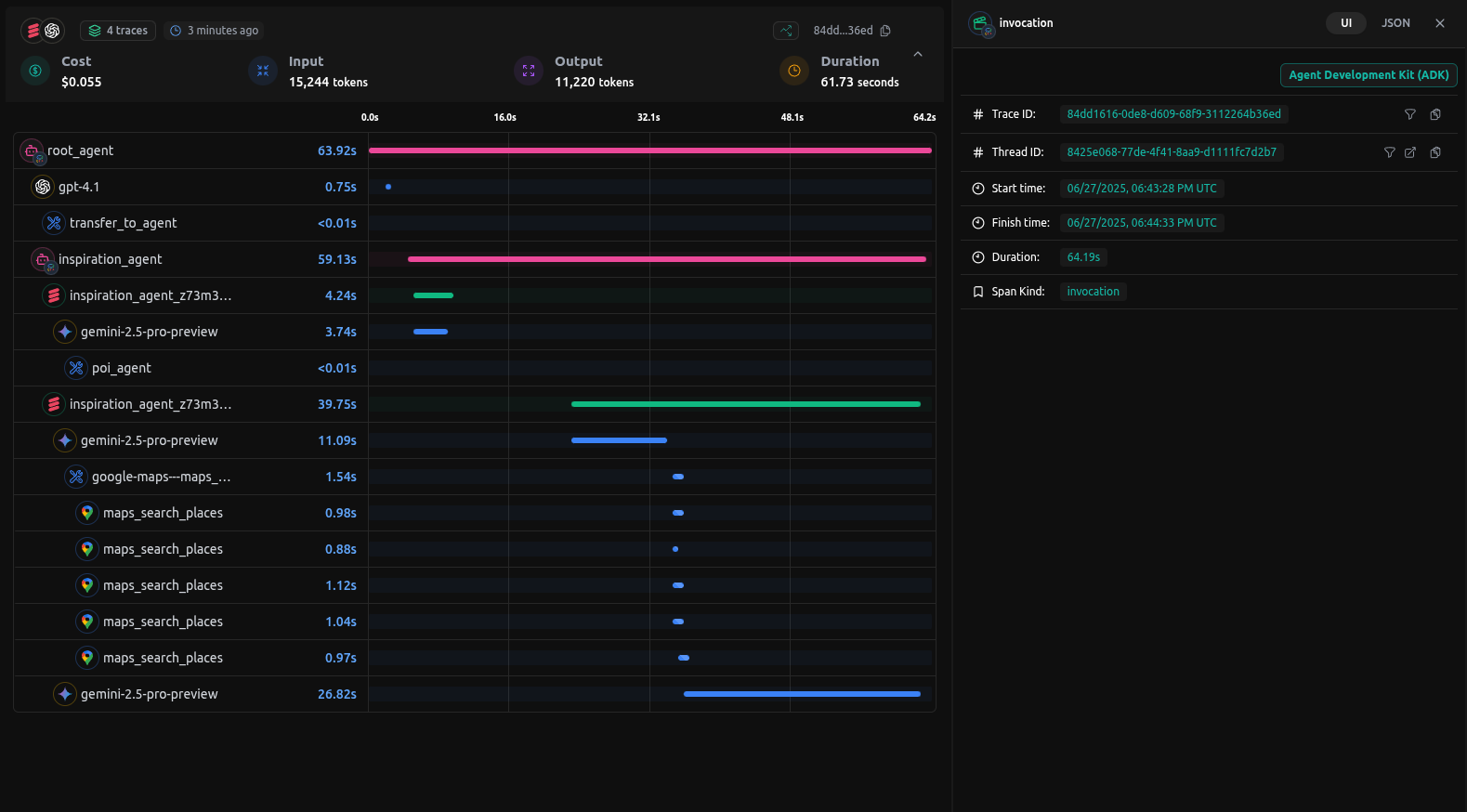
Checkout: https://app.langdb.ai/sharing/threads/8425e068-77de-4f41-8aa9-d1111fc7d2b7
Installation
Enable end-to-end tracing for your Google ADK agents by installing the pylangdb client with the ADK feature flag:
pip install 'pylangdb[adk]'
Quick Start
Set your environment variables before initializing running the script:
export LANGDB_API_KEY="<your_langdb_api_key>"
export LANGDB_PROJECT_ID="<your_langdb_project_id>"
Initialize LangDB before creating or running any ADK agents:
from pylangdb.adk import init
# Initialise LangDB
init()

# Then proceed with your normal ADK setup:
from google.adk.agents import Agent
# ...define and run agents...
Once initialized, LangDB automatically discovers all agents and sub-agents (including nested folders), wraps their key methods at runtime, and links sessions for full end-to-end tracing across your workflow as well.
Complete Google ADK Python Example
Here's a full example of a Google ADK agent implementation that you can instrument with LangDB. This sample is based on the official Google ADK Quickstart.
Example code
Check out the full sample on GitHub: https://github.com/langdb/langdb-samples/tree/main/examples/google-adk/multi-tool-agent
Setup Environment
pip install google-adk litellm 'pylangdb[adk]'
Project Structure
Create the following project structure:
parent_folder/
└── multi_tool_agent/
    ├── __init__.py
    ├── agent.py
    └── .env
init.py
Create an __init__.py file in the multi_tool_agent folder:
from . import agent
.env
Create .env file for your secrets
LANGDB_API_KEY="<your_langdb_api_key>"
LANGDB_PROJECT_ID="<your_langdb_project_id>"
agent.py
Create an agent.py file with the following code:
# First initialize LangDB before defining any agents
from pylangdb.adk import init
init()

import datetime
from zoneinfo import ZoneInfo
from google.adk.agents import Agent

def get_weather(city: str) -> dict:
    if city.lower() != "new york":
        return {"status": "error", "error_message": f"Weather information for '{city}' is not available."}
    return {"status": "success", "report": "The weather in New York is sunny with a temperature of 25 degrees Celsius (77 degrees Fahrenheit)."}

def get_current_time(city: str) -> dict:
    if city.lower() != "new york":
        return {"status": "error", "error_message": f"Sorry, I don't have timezone information for {city}."}
    tz = ZoneInfo("America/New_York")
    now = datetime.datetime.now(tz)
    return {"status": "success", "report": f'The current time in {city} is {now.strftime("%Y-%m-%d %H:%M:%S %Z%z")}'}

root_agent = Agent(
    name="weather_time_agent",
    model="gemini-2.0-flash",
    description=("Agent to answer questions about the time and weather in a city." ),
    instruction=("You are a helpful agent who can answer user questions about the time and weather in a city."),
    tools=[get_weather, get_current_time],
)
Running Your Agent
Navigate to the parent directory of your agent project and use the following commands:
adk web
Open the URL provided (usually http://localhost:8000) in your browser and select "multi_tool_agent" from the dropdown menu.
Once your agent is running, try these example queries to test its functionality:
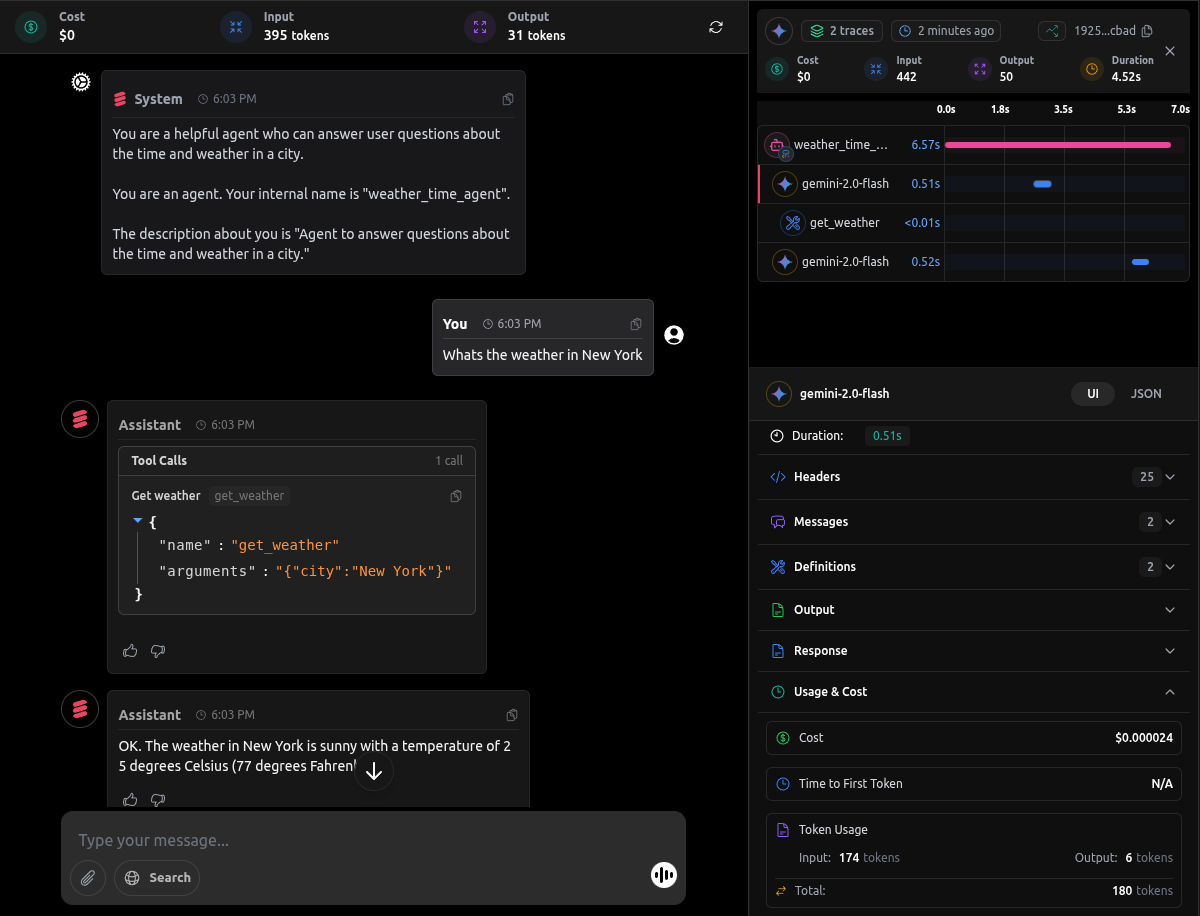
Whats the weather in New York?
These queries will trigger the agent to use the functions we defined and provide responses based on the our agent workflow.
Traces on LangDB
When you run queries against your ADK agent, LangDB automatically captures detailed traces of all agent interactions:
Next Steps: Advanced Google ADK Integration
This guide covered the basics of integrating LangDB with Google ADK using a simple weather and time agent example. For more complex scenarios and advanced use cases, check out our comprehensive resources in Guides Section.